Candid — Chrome Extension
Candid — Chrome Extension
Role: Product Designer, built & shipped (not public)
Role: Product Designer, built & shipped (not public)
Recruiters screen dozens of profiles a day. Every existing tool asks them to leave Linkedin, paste a URL, wait for results. Candid doesn't. One click or one shortcut — profile captured, data structured, ready to export. Built end to end to understand what building actually feels like.
Recruiters screen dozens of profiles a day. Every existing tool asks them to leave Linkedin, paste a URL, wait for results. Candid doesn't. One click or one shortcut — profile captured, data structured, ready to export. Built end to end to understand what building actually feels like.
Recruiters screen dozens of profiles a day. Every existing tool asks them to leave Linkedin, paste a URL, wait for results. Candid doesn't. One click or one shortcut — profile captured, data structured, ready to export. Built end to end to understand what building actually feels like.
Problem
Problem
Recruiters screening candidates on Linkedin have a repetitive manual step that nobody talks about — copying profile information into a spreadsheet by hand. Name, current role, experience, education. Profile by profile. It's not a hard problem but it's a constant one, and it adds up across a hiring cycle.
Most tools that try to fix this take you away from where you already are. You paste a URL somewhere, wait, get a result.
This is specifically about outbound sourcing — when a recruiter is hunting for candidates who haven't applied yet. There's no CV. A Linkedin profile and a decision about whether to reach out.
Recruiters screening candidates on Linkedin have a repetitive manual step that nobody talks about — copying profile information into a spreadsheet by hand. Name, current role, experience, education. Profile by profile. It's not a hard problem but it's a constant one, and it adds up across a hiring cycle.
Most tools that try to fix this take you away from where you already are. You paste a URL somewhere, wait, get a result.
This is specifically about outbound sourcing — when a recruiter is hunting for candidates who haven't applied yet. There's no CV. A Linkedin profile and a decision about whether to reach out.
Recruiters screening candidates on Linkedin have a repetitive manual step that nobody talks about — copying profile information into a spreadsheet by hand. Name, current role, experience, education. Profile by profile. It's not a hard problem but it's a constant one, and it adds up across a hiring cycle.
Most tools that try to fix this take you away from where you already are. You paste a URL somewhere, wait, get a result.
This is specifically about outbound sourcing — when a recruiter is hunting for candidates who haven't applied yet. There's no CV. A Linkedin profile and a decision about whether to reach out.
Idea
Idea
A Chrome extension made sense because the recruiter's attention is already on the profile in front of them. Pulling them out of that context — even for thirty seconds — breaks the rhythm of screening. The tool needed to work inside that rhythm, not interrupt it.
The scope was deliberately narrow — the specific moment where a recruiter wants to save what they're looking at without stopping to do it manually.
A Chrome extension made sense because the recruiter's attention is already on the profile in front of them. Pulling them out of that context — even for thirty seconds — breaks the rhythm of screening. The tool needed to work inside that rhythm, not interrupt it.
The scope was deliberately narrow — the specific moment where a recruiter wants to save what they're looking at without stopping to do it manually.
A Chrome extension made sense because the recruiter's attention is already on the profile in front of them. Pulling them out of that context — even for thirty seconds — breaks the rhythm of screening. The tool needed to work inside that rhythm, not interrupt it.
The scope was deliberately narrow — the specific moment where a recruiter wants to save what they're looking at without stopping to do it manually.
Pivot
Pivot
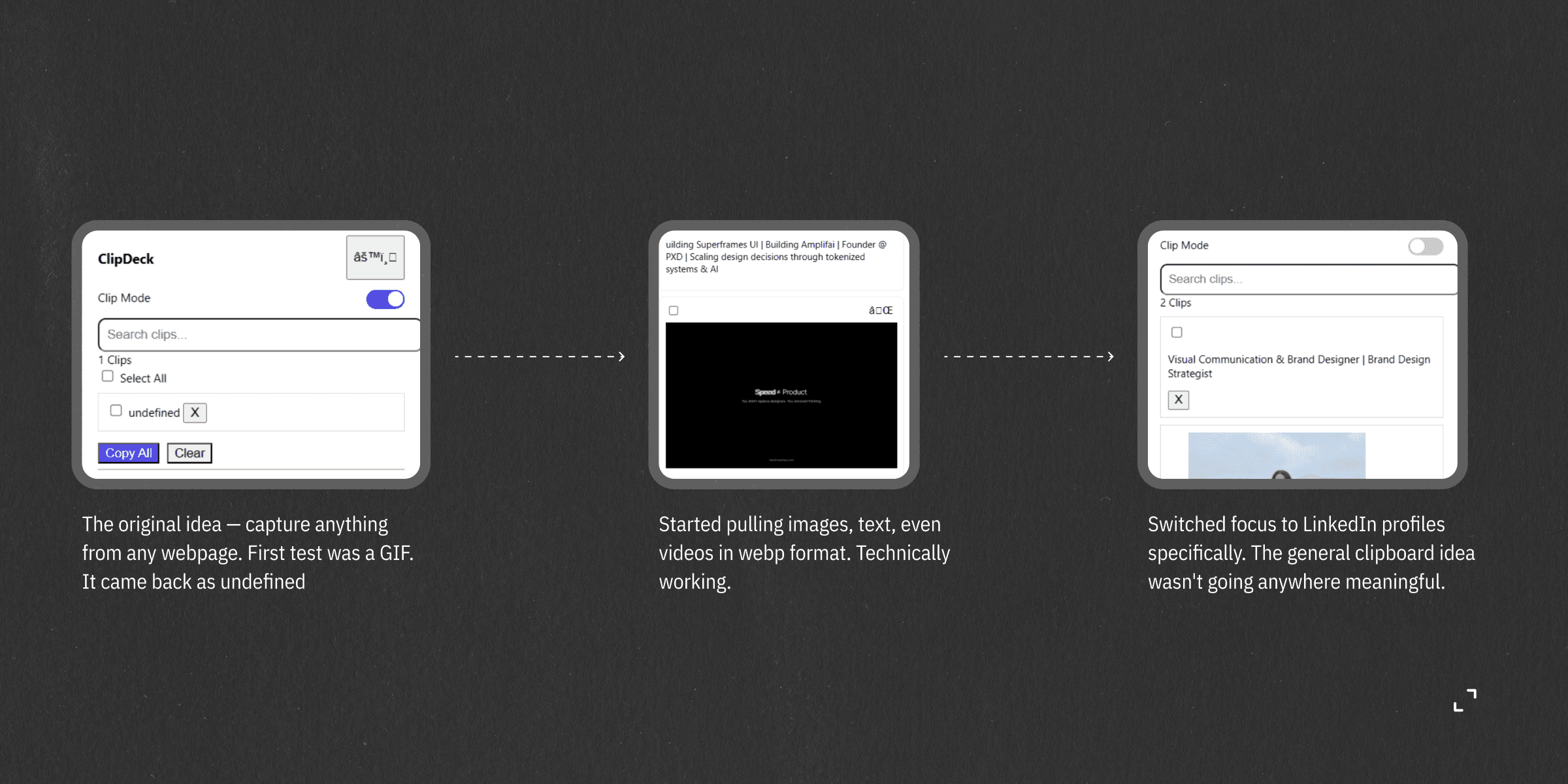
This started as a general clipboard tool — the original idea was to capture anything on any webpage- text, images, GIFs, without downloading. That's where the first name came from too — ClipDeck, a deck of clips from across the web.
The more I built, the less convincing it got. A recruiter going through twenty Linkedin profiles in a sitting has a completely different need than someone saving content from Twitter. Trying to serve both in one tool meant serving neither particularly well.
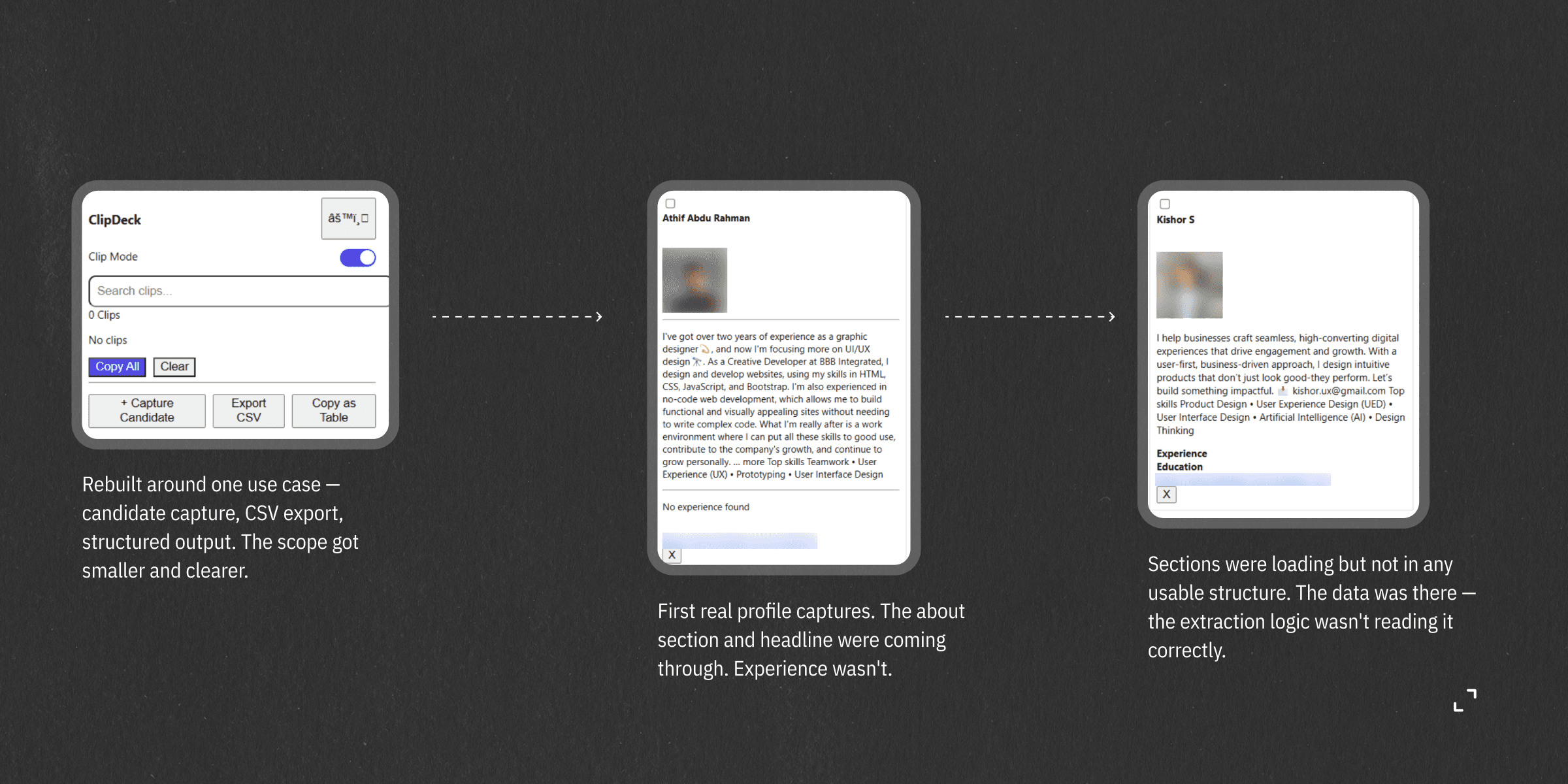
So the general clipping was cut entirely. The entire codebase — event listeners, UI, storage logic — was refactored around one user and one context. The name changed with it. Candid — as in candidate. That decision made every subsequent choice more obvious.
This started as a general clipboard tool — the original idea was to capture anything on any webpage- text, images, GIFs, without downloading. That's where the first name came from too — ClipDeck, a deck of clips from across the web.
The more I built, the less convincing it got. A recruiter going through twenty Linkedin profiles in a sitting has a completely different need than someone saving content from Twitter. Trying to serve both in one tool meant serving neither particularly well.
So the general clipping was cut entirely. The entire codebase — event listeners, UI, storage logic — was refactored around one user and one context. The name changed with it. Candid — as in candidate. That decision made every subsequent choice more obvious.
This started as a general clipboard tool — the original idea was to capture anything on any webpage- text, images, GIFs, without downloading. That's where the first name came from too — ClipDeck, a deck of clips from across the web.
The more I built, the less convincing it got. A recruiter going through twenty Linkedin profiles in a sitting has a completely different need than someone saving content from Twitter. Trying to serve both in one tool meant serving neither particularly well.
So the general clipping was cut entirely. The entire codebase — event listeners, UI, storage logic — was refactored around one user and one context. The name changed with it. Candid — as in candidate. That decision made every subsequent choice more obvious.
Process
Process
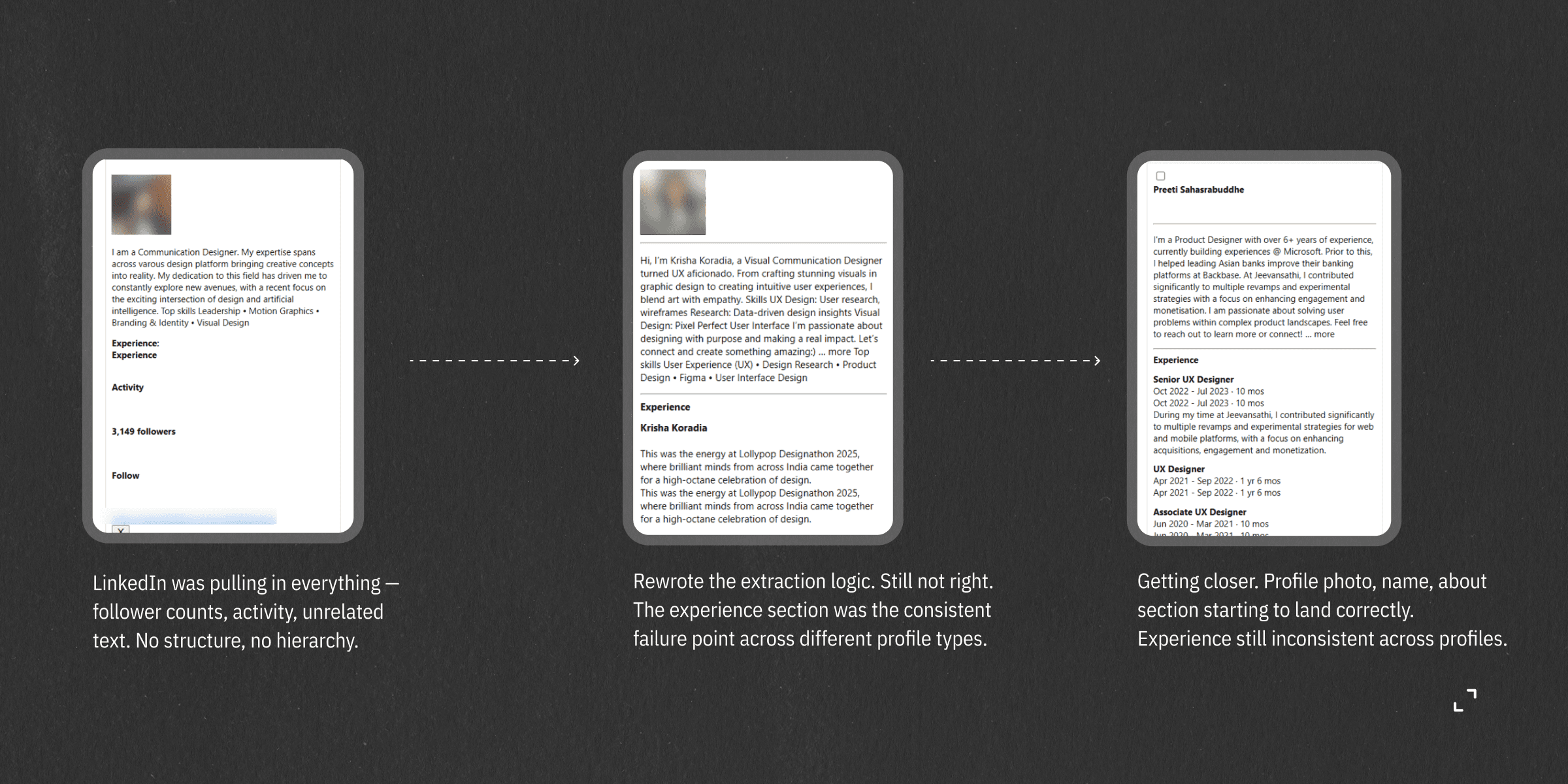
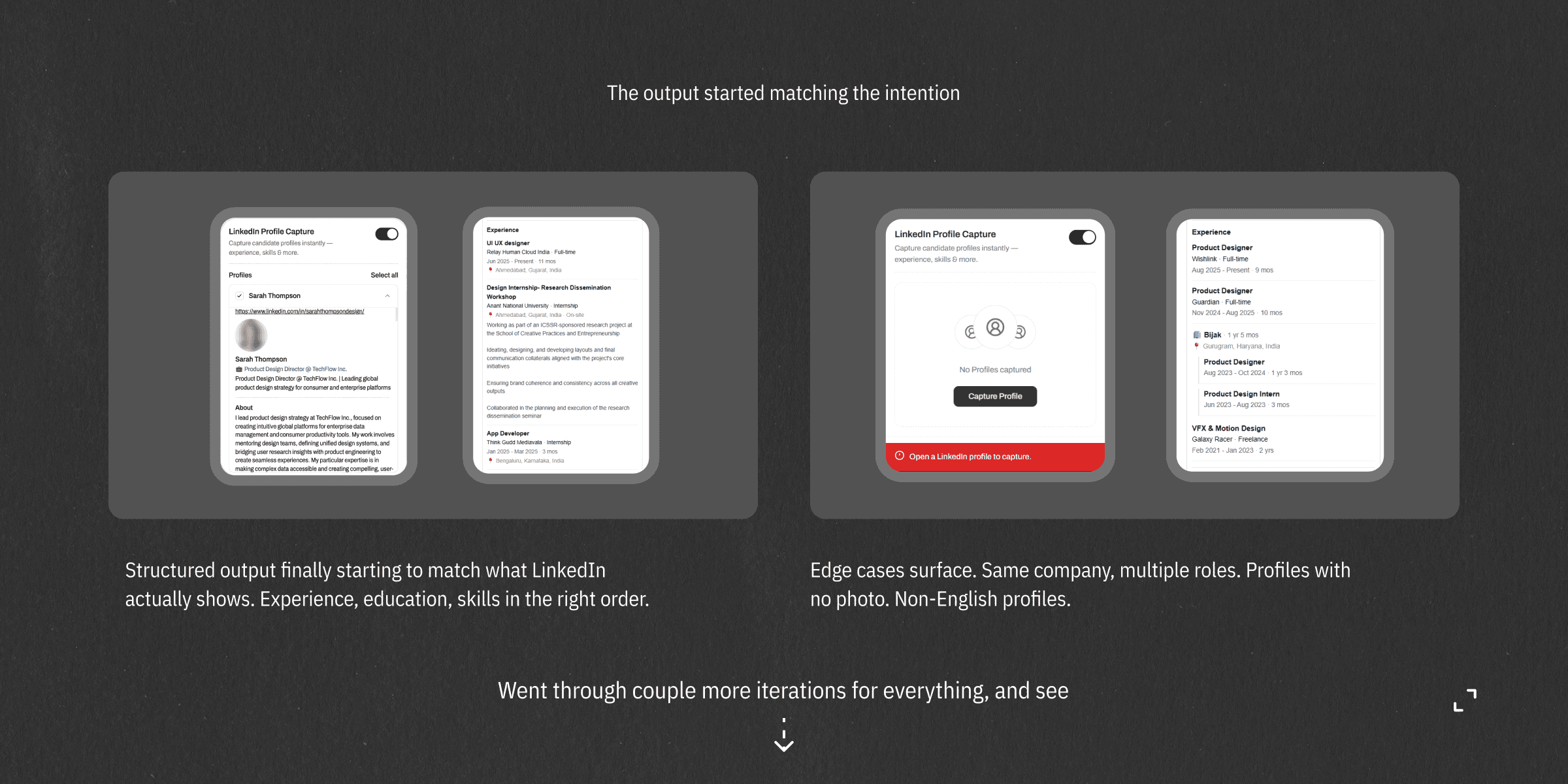
This didn't start where it ended. The screenshots below are from the actual build — the early versions of ClipDeck as a general clipboard tool, the moments where things broke, and towards the profile capture.
This didn't start where it ended. The screenshots below are from the actual build — the early versions of ClipDeck as a general clipboard tool, the moments where things broke, and towards the profile capture.
What got built
What got built
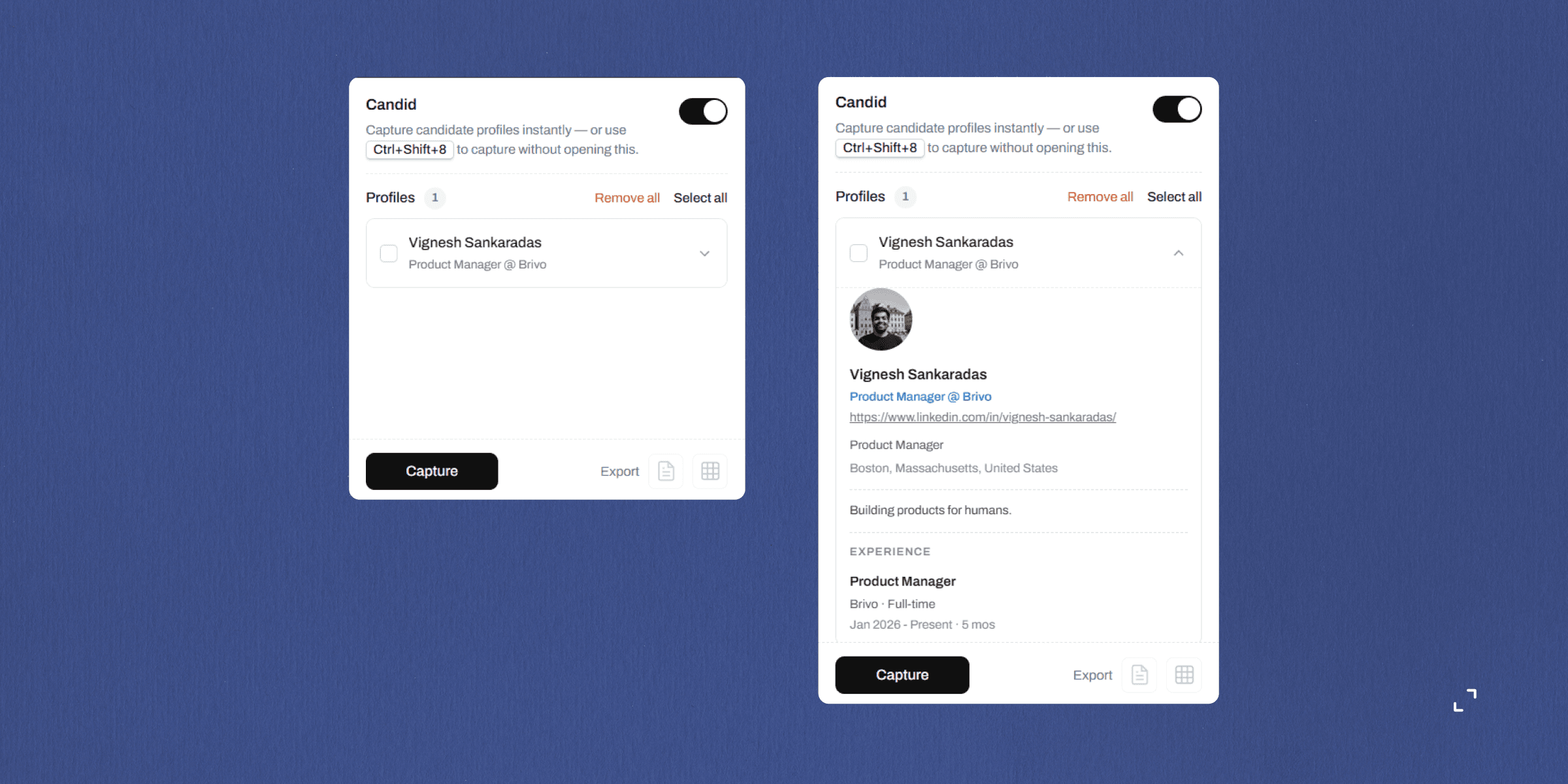
The extension captures profile photo, name, current role, headline, location, about section, full experience with multi-role company handling, education — stored locally in Chrome's extension storage, no server involved.
The extension captures profile photo, name, current role, headline, location, about section, full experience with multi-role company handling, education — stored locally in Chrome's extension storage, no server involved.
FEW DECISIONS WORTH EXPLAINING
Manual scroll before capture — Linkedin lazy-loads sections as you scroll down the page. The recruiter needs to scroll the profile once before capturing to ensure everything has loaded. This is a known limitation, documented rather than hidden.
FEW DECISIONS WORTH EXPLAINING
Manual scroll before capture — Linkedin lazy-loads sections as you scroll down the page. The recruiter needs to scroll the profile once before capturing to ensure everything has loaded. This is a known limitation, documented rather than hidden.
FEW DECISIONS WORTH EXPLAINING
Manual scroll before capture — Linkedin lazy-loads sections as you scroll down the page. The recruiter needs to scroll the profile once before capturing to ensure everything has loaded. This is a known limitation, documented rather than hidden.
Keyboard shortcut — The recruiter never needs to open the extension — one keypress captures the current profile. The shortcut is configured in the extension manifest and triggers the same full capture flow as the button. The intent was to reduce the interaction to almost nothing for a recruiter in a screening rhythm — open profile, press shortcut, move on.
Keyboard shortcut — The recruiter never needs to open the extension — one keypress captures the current profile. The shortcut is configured in the extension manifest and triggers the same full capture flow as the button. The intent was to reduce the interaction to almost nothing for a recruiter in a screening rhythm — open profile, press shortcut, move on.
Keyboard shortcut — The recruiter never needs to open the extension — one keypress captures the current profile. The shortcut is configured in the extension manifest and triggers the same full capture flow as the button. The intent was to reduce the interaction to almost nothing for a recruiter in a screening rhythm — open profile, press shortcut, move on.


Export — Captured profiles export to CSV for spreadsheet use. The Google Sheets option works differently — it copies the data as tab-separated values to the clipboard and opens a new Sheet directly. The recruiter pastes once and the data lands as a structured table. No OAuth and API keys. The tradeoff is one manual paste step, which felt worth it over building an authentication dependency into a personal tool.
Export — Captured profiles export to CSV for spreadsheet use. The Google Sheets option works differently — it copies the data as tab-separated values to the clipboard and opens a new Sheet directly. The recruiter pastes once and the data lands as a structured table. No OAuth and API keys. The tradeoff is one manual paste step, which felt worth it over building an authentication dependency into a personal tool.
Export — Captured profiles export to CSV for spreadsheet use. The Google Sheets option works differently — it copies the data as tab-separated values to the clipboard and opens a new Sheet directly. The recruiter pastes once and the data lands as a structured table. No OAuth and API keys. The tradeoff is one manual paste step, which felt worth it over building an authentication dependency into a personal tool.
Floating widget — A small persistent widget stays on the Linkedin page showing how many profiles have been captured, with actual profile photos pulled from the captured data. It updates in real time after each capture with a subtle animation so the recruiter knows it worked without any confirmation dialog.
Floating widget — A small persistent widget stays on the Linkedin page showing how many profiles have been captured, with actual profile photos pulled from the captured data. It updates in real time after each capture with a subtle animation so the recruiter knows it worked without any confirmation dialog.
Floating widget — A small persistent widget stays on the Linkedin page showing how many profiles have been captured, with actual profile photos pulled from the captured data. It updates in real time after each capture with a subtle animation so the recruiter knows it worked without any confirmation dialog.
Hard part
Hard part
Linkedin's HTML structure for the experience section is not consistent across profiles. Depending on when a profile was created and which interface version Linkedin is serving, the same data — a person's work history — is structured differently in the underlying markup. A profile showing multiple roles at the same company might render those roles as nested div elements, or as list items inside a ul, or as sibling elements sharing a parent. Three patterns, same visual output, completely different extraction logic required for each.
Linkedin's HTML structure for the experience section is not consistent across profiles. Depending on when a profile was created and which interface version Linkedin is serving, the same data — a person's work history — is structured differently in the underlying markup. A profile showing multiple roles at the same company might render those roles as nested div elements, or as list items inside a ul, or as sibling elements sharing a parent. Three patterns, same visual output, completely different extraction logic required for each.
Linkedin's HTML structure for the experience section is not consistent across profiles. Depending on when a profile was created and which interface version Linkedin is serving, the same data — a person's work history — is structured differently in the underlying markup. A profile showing multiple roles at the same company might render those roles as nested div elements, or as list items inside a ul, or as sibling elements sharing a parent. Three patterns, same visual output, completely different extraction logic required for each.
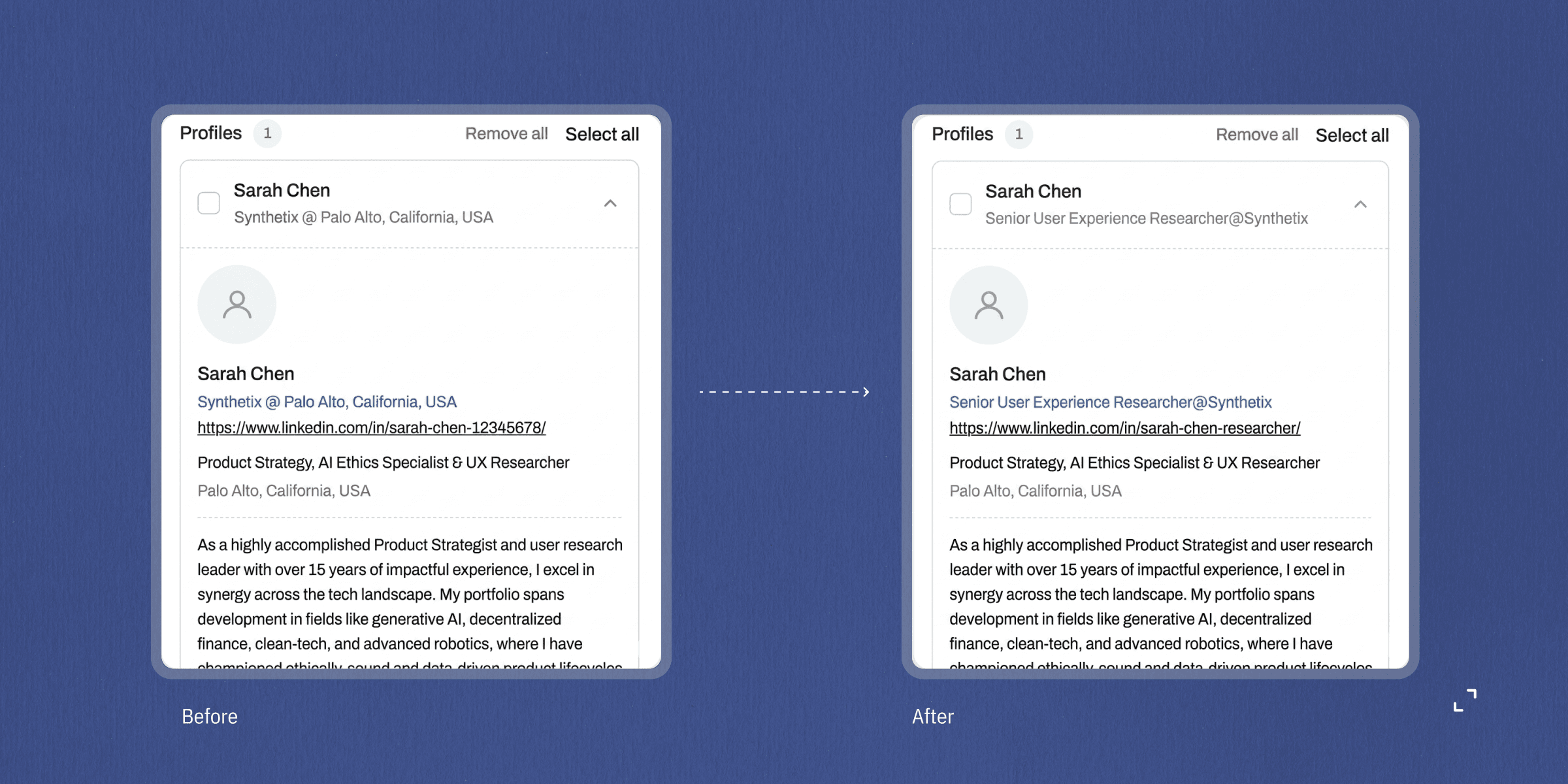
Getting the current role to show correctly for multi-role profiles — "Senior Experience Designer @ Verizon" rather than just "Verizon" — was the most iterated problem in the project. The company name kept appearing as the role because both pieces of text matched the same extraction criteria. The fix was to extract the company name first from the parent element, then explicitly exclude it when searching for the role title in the child elements.
This took more iterations than anything else in the project. It still doesn't handle every edge case perfectly, but it fails predictably rather than silently.
Getting the current role to show correctly for multi-role profiles — "Senior Experience Designer @ Verizon" rather than just "Verizon" — was the most iterated problem in the project. The company name kept appearing as the role because both pieces of text matched the same extraction criteria. The fix was to extract the company name first from the parent element, then explicitly exclude it when searching for the role title in the child elements.
This took more iterations than anything else in the project. It still doesn't handle every edge case perfectly, but it fails predictably rather than silently.
Getting the current role to show correctly for multi-role profiles — "Senior Experience Designer @ Verizon" rather than just "Verizon" — was the most iterated problem in the project. The company name kept appearing as the role because both pieces of text matched the same extraction criteria. The fix was to extract the company name first from the parent element, then explicitly exclude it when searching for the role title in the child elements.
This took more iterations than anything else in the project. It still doesn't handle every edge case perfectly, but it fails predictably rather than silently.
Working with AI
Working with AI
An earlier attempt using ChatGPT stalled on the experience extraction problem. The DOM inconsistency was producing wrong outputs and the fixes weren't holding. Switching to Claude resolved it — not because Claude is categorically better, but because the nature of the problem required reasoning through multiple nested fallbacks simultaneously, and that's where the difference showed up in practice.
An earlier attempt using ChatGPT stalled on the experience extraction problem. The DOM inconsistency was producing wrong outputs and the fixes weren't holding. Switching to Claude resolved it — not because Claude is categorically better, but because the nature of the problem required reasoning through multiple nested fallbacks simultaneously, and that's where the difference showed up in practice.
An earlier attempt using ChatGPT stalled on the experience extraction problem. The DOM inconsistency was producing wrong outputs and the fixes weren't holding. Switching to Claude resolved it — not because Claude is categorically better, but because the nature of the problem required reasoning through multiple nested fallbacks simultaneously, and that's where the difference showed up in practice.
The more useful discovery was about how to work with AI effectively. Early prompts were vague — "the experience section isn't working." The outputs matched the vagueness. When the problem descriptions became specific — describing the exact HTML pattern, the exact field that was wrong, the exact profile type that was failing — the quality of what came back changed noticeably.
The more useful discovery was about how to work with AI effectively. Early prompts were vague — "the experience section isn't working." The outputs matched the vagueness. When the problem descriptions became specific — describing the exact HTML pattern, the exact field that was wrong, the exact profile type that was failing — the quality of what came back changed noticeably.
The more useful discovery was about how to work with AI effectively. Early prompts were vague — "the experience section isn't working." The outputs matched the vagueness. When the problem descriptions became specific — describing the exact HTML pattern, the exact field that was wrong, the exact profile type that was failing — the quality of what came back changed noticeably.
Small things
Small things
During scanning, the floating widget shows two small eye circles with moving pupils alongside "Scanning..." — because a static label while waiting felt flat. The floating widget does a brief wiggle after each capture. Profile rows slide in with a staggered cascade when the list loads. The capture button uses a 3D cube-flip loader instead of a spinner. A two-tone chime plays on successful capture, synthesised through the Web Audio API, no audio file.
During scanning, the floating widget shows two small eye circles with moving pupils alongside "Scanning..." — because a static label while waiting felt flat. The floating widget does a brief wiggle after each capture. Profile rows slide in with a staggered cascade when the list loads. The capture button uses a 3D cube-flip loader instead of a spinner. A two-tone chime plays on successful capture, synthesised through the Web Audio API, no audio file.
During scanning, the floating widget shows two small eye circles with moving pupils alongside "Scanning..." — because a static label while waiting felt flat. The floating widget does a brief wiggle after each capture. Profile rows slide in with a staggered cascade when the list loads. The capture button uses a 3D cube-flip loader instead of a spinner. A two-tone chime plays on successful capture, synthesised through the Web Audio API, no audio file.

What didn't ship and why
What didn't ship and why
The auto-scroll was implemented in code — the extension was designed to scroll the page programmatically on capture so Linkedin's lazy-loading triggers without the recruiter doing it manually. In practice it doesn't fire reliably across all profile types due to how Linkedin handles scroll events on its own page. The manual scroll step remains a known limitation rather than a solved one.
The "Show all" limitation — Linkedin collapses long experience and education lists behind a "Show all" button. The extension fetches those expanded pages in the background when that button exists, but the content Linkedin returns from those pages is server-rendered and incomplete — the full details only appear after JavaScript runs in a real browser session. So what gets captured is what's visible on the profile page itself. For most profiles this covers the recent and relevant experience. For candidates with ten or more roles, older entries may be missing. This is a known constraint of how Linkedin serves its data, not something fixable from the extension side without a fundamentally different approach.
The legal decision was made after the build, not during it. Linkedin's Terms of Service prohibit automated data collection — meaning any tool that reads and stores profile data without the user manually doing it themselves is in violation, regardless of how it's built or who it's built for. They've pursued enforcement before — the hiQ Labs case went through multiple court stages before settling. Shipping this publicly would mean building on a foundation that could be challenged or removed at any point. That wasn't a risk worth taking for a tool at this scale.
The project stays as a technical and product exploration rather than a public product. That's a place to leave it.
The auto-scroll was implemented in code — the extension was designed to scroll the page programmatically on capture so Linkedin's lazy-loading triggers without the recruiter doing it manually. In practice it doesn't fire reliably across all profile types due to how Linkedin handles scroll events on its own page. The manual scroll step remains a known limitation rather than a solved one.
The "Show all" limitation — Linkedin collapses long experience and education lists behind a "Show all" button. The extension fetches those expanded pages in the background when that button exists, but the content Linkedin returns from those pages is server-rendered and incomplete — the full details only appear after JavaScript runs in a real browser session. So what gets captured is what's visible on the profile page itself. For most profiles this covers the recent and relevant experience. For candidates with ten or more roles, older entries may be missing. This is a known constraint of how Linkedin serves its data, not something fixable from the extension side without a fundamentally different approach.
The legal decision was made after the build, not during it. Linkedin's Terms of Service prohibit automated data collection — meaning any tool that reads and stores profile data without the user manually doing it themselves is in violation, regardless of how it's built or who it's built for. They've pursued enforcement before — the hiQ Labs case went through multiple court stages before settling. Shipping this publicly would mean building on a foundation that could be challenged or removed at any point. That wasn't a risk worth taking for a tool at this scale.
The project stays as a technical and product exploration rather than a public product. That's a place to leave it.
The auto-scroll was implemented in code — the extension was designed to scroll the page programmatically on capture so Linkedin's lazy-loading triggers without the recruiter doing it manually. In practice it doesn't fire reliably across all profile types due to how Linkedin handles scroll events on its own page. The manual scroll step remains a known limitation rather than a solved one.
The "Show all" limitation — Linkedin collapses long experience and education lists behind a "Show all" button. The extension fetches those expanded pages in the background when that button exists, but the content Linkedin returns from those pages is server-rendered and incomplete — the full details only appear after JavaScript runs in a real browser session. So what gets captured is what's visible on the profile page itself. For most profiles this covers the recent and relevant experience. For candidates with ten or more roles, older entries may be missing. This is a known constraint of how Linkedin serves its data, not something fixable from the extension side without a fundamentally different approach.
The legal decision was made after the build, not during it. Linkedin's Terms of Service prohibit automated data collection — meaning any tool that reads and stores profile data without the user manually doing it themselves is in violation, regardless of how it's built or who it's built for. They've pursued enforcement before — the hiQ Labs case went through multiple court stages before settling. Shipping this publicly would mean building on a foundation that could be challenged or removed at any point. That wasn't a risk worth taking for a tool at this scale.
The project stays as a technical and product exploration rather than a public product. That's a place to leave it.
What this changed
What this changed
I started this knowing how to design. I finished it knowing more about what I was actually designing on top of — the storage limits, the DOM inconsistencies, the places where the browser just won't cooperate.
That gap between the two used to feel like someone else's problem. It doesn't anymore.
I got more comfortable sitting with something that works but isn't finished. Not every limitation in this project is fixable. Some of them just are what they are. Knowing the difference — between "this needs more work" and "this is the ceiling" — took longer to figure out than most of the actual building.
I started this knowing how to design. I finished it knowing more about what I was actually designing on top of — the storage limits, the DOM inconsistencies, the places where the browser just won't cooperate.
That gap between the two used to feel like someone else's problem. It doesn't anymore.
I got more comfortable sitting with something that works but isn't finished. Not every limitation in this project is fixable. Some of them just are what they are. Knowing the difference — between "this needs more work" and "this is the ceiling" — took longer to figure out than most of the actual building.
I started this knowing how to design. I finished it knowing more about what I was actually designing on top of — the storage limits, the DOM inconsistencies, the places where the browser just won't cooperate.
That gap between the two used to feel like someone else's problem. It doesn't anymore.
I got more comfortable sitting with something that works but isn't finished. Not every limitation in this project is fixable. Some of them just are what they are. Knowing the difference — between "this needs more work" and "this is the ceiling" — took longer to figure out than most of the actual building.